
Small talk is easy, but deep connection requires intention. Our Conversation Decks are the backbone of our 'Round One' discussions, providing the structure needed to skip surface-level updates and dive straight into values, dreams, and personal stories in a safe environment.
Quick Navigation
- Why Use Conversation Decks?
- Try a Sample Question
- 1. Choosing a Topic
- 2. Facilitation Styles (How to Play)
- 3. Controlling Intensity & Format
- 4. Filtering by Sub-Category
- 5. The All-in-One Mixer
- 6. Global Curiosities
- 7. Facilitating (Focus Mode)
- 8. Managing Your Saved Collection
- 9. Advanced Tools & Sharing
- Full Topic Catalog
Why Use Conversation Decks?
Small talk is easy, but deep connection requires intention. Our decks are designed to skip the weather talk and get straight to what matters.
-
Go Deeper Faster: Carefully curated questions move the conversation beyond surface-level updates into values, dreams, and stories.
-
Create Safe Space: A structured question gives "permission" to share things we usually keep hidden, removing the fear of oversharing.
-
Hear Every Voice: Random selection and turn-taking ensure that quiet voices are heard just as much as the loudest ones in the room.
Try a Sample Question
Get a feel for the conversation. Click below to draw a random card from our various decks.
...
1. Choosing a Topic
Before you dive into the settings, the first step is selecting the right theme for your gathering. We categorize our decks into four main pillars (found in the Topic Catalog below):
- Self-Discovery: Introspective themes like Adulthood or Resilience. Best for quiet reflection or deep sharing where vulnerability is encouraged.
- Connection (Relationships): Topics like Friendship and Parenting that explore the invisible threads connecting us.
- Work & Purpose: Decks like Flow or Synergy designed for professional groups, teams, or co-founders.
- General Mixers: Use Global Curiosities or Icebreakers for broader, less specific conversations.
Unsure what to pick?
Start with the
Icebreaker
deck for a safe warm-up, or use the
All-in-One Mixer
to create a custom blend of multiple topics for your gathering.
2. Facilitation Styles (How to Play)
There is no "wrong" way to use these cards, but here are three formats we love.
Option A: The "Menu" Method 🍽️
Best for deeper conversations where people need options.
- Set the "No. to pick" setting to 3.
- Hit "Next Random Question".
- The speaker looks at the 3 options and picks one that resonates with them most.
- This gives participants agency and avoids putting them on the spot with a question they might hate.
Option B: Dice Breaker 🎲
Best for gamifying the experience.
- Tap the floating Dice Icon in the corner.
- Roll the dice to see which color (Blue/Yellow/Red) is selected.
- Reveal the color of your question card by tapping it.
- Whoever has the matching color answers first!
Top Tip 💡: Want to master the art of hosting? Check out our Event Structure Guide. It covers exactly how to run Round One & Round Two, manage large groups using the "Breakout" format, and create "Moments of Truth" at the end of your session.
3. Controlling Intensity & Format
Every group is different. That's why our decks come with "Intensity Filters" at the top of the page. You can adjust the slider to filter specific types of questions.
- Lite 🌱: Fun, easy, low-stakes questions (relatively). Perfect for warming up or breaking the ice with new people.
- Medium: Standard questions that invite stories and opinions without getting overly heavy.
- Deep 🌀: Introspective questions that require more vulnerability. Best for established groups or "Deep Talk" sessions.
Concise vs. Expanded Prompts (Flip Mode)
Some questions come with both a short, punchy summary and a longer, detailed background context.
- Concise Toggle: Use the "Concise" switch at the top to default all cards to their shortest version.
- On-the-fly Flipping: Tap the Flip icon above the reading controls to instantly toggle between the short and expanded versions of the questions currently on your screen.
Native Bilingual Translation
Hosting a multilingual group? Use the language dropdown at the top of the page to instantly translate the prompts into Dutch, Korean, or Cantonese. The translations seamlessly integrate with Flip Mode, allowing you to view concise translations on the fly!
Random vs. Sequential Reading
Just below the intensity filters, you will find a toggle to switch between Random and Sequential modes:
- Random Mode: Draws questions like a shuffled deck. Best for spontaneous group conversations.
- Sequential Mode (Infinite Carousel): Reads the deck in order. The deck seamlessly loops from the end back to the beginning, meaning you will never hit a dead end.
- Smart Progress Saving: When reading sequentially, the app drops a hidden "anchor" on your current question. Your exact reading position is automatically saved—even if you change filters, close the browser, or switch decks!
4. Filtering by Sub-Category
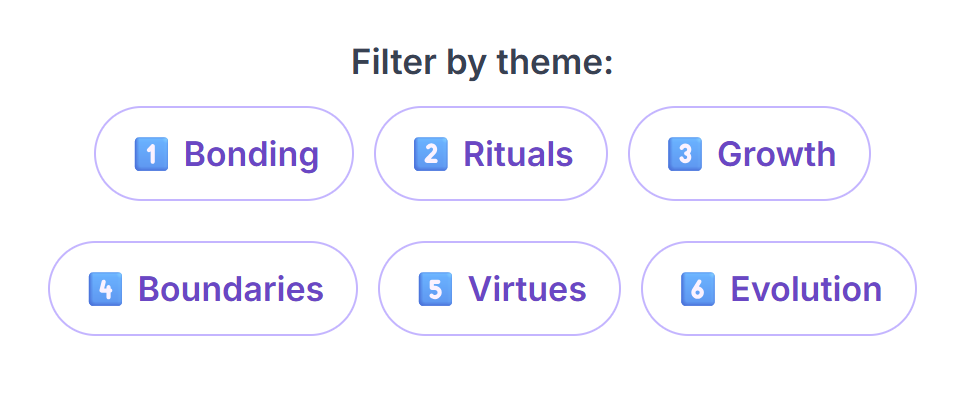
In addition to intensity, many decks (such as Friendship or Adulthood) allow you to filter by specific sub-themes. Look for the numbered buttons at the top of the deck page:
- 🎯 Target Specifics: Want to focus purely on "Rituals" or "Boundaries"? Tap the corresponding category button (e.g., 2️⃣ Rituals) to hide everything else.
- ✨ Combine Filters: You can use Category filters and Intensity filters together. For example, you can select the "Growth" category and then toggle on "Deep" to see only the deep growth-related questions.
The Core Filter (Pink Pill)
Some decks feature a special Pink "Core" filter pill. Tapping this instantly narrows the deck down to only the most essential, highly-recommended questions—perfect for a quick session or if you are unsure where to start.
5. The All-in-One Mixer
The All-in-One Deck is a special tool that combines every topic we have into one massive deck. It allows you to build a custom mix for your specific event.
Choose Topics Filter
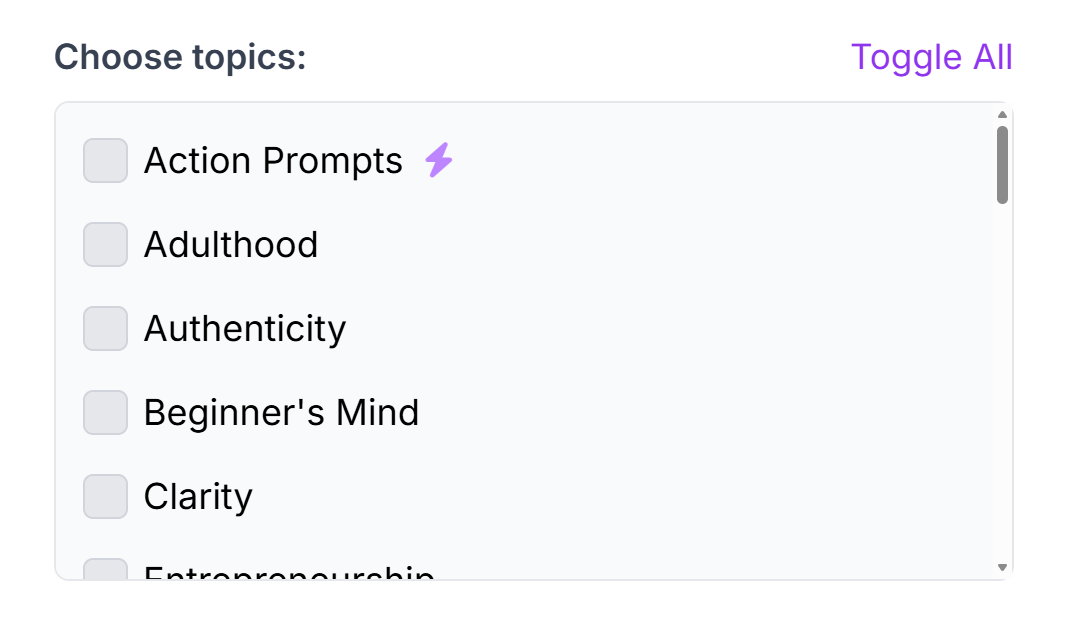
At the top of the All-in-One page, you will see a "Choose topics" list. This lets you curate exactly what categories appear.
- Toggle All: Quickly select or deselect everything.
- Mix & Match: Want a session on just "Happiness" and "Flourishing"? Uncheck everything else and select just those two.
- Action Prompts: A hidden gem! Want to mix the set with some fun meaningful challenges before answering a question? Check the "Action Prompts" box.
6. Global Curiosities
The Global Curiosities Deck features questions sourced from our real-world events across different cities.
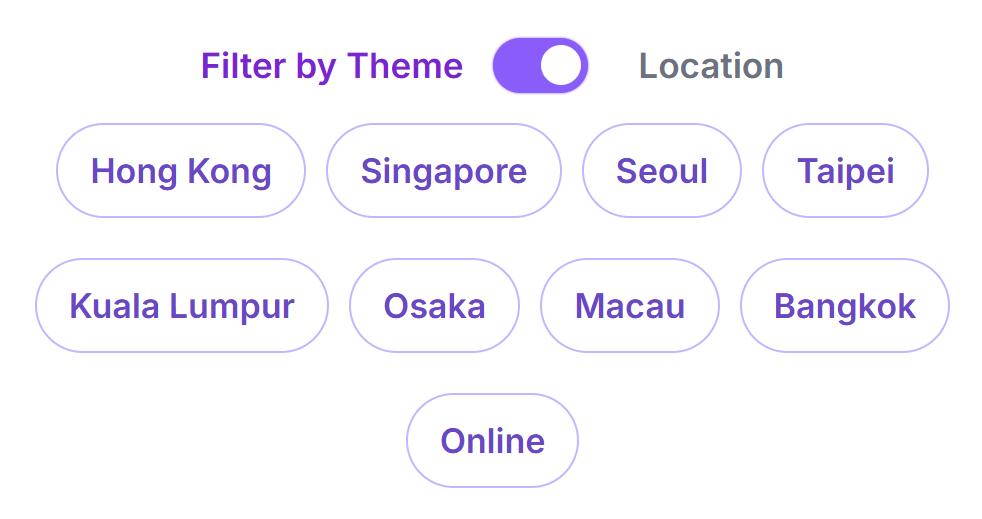
Location vs. Theme Toggle
At the top of this deck, you will see a unique toggle switch:
- Theme Mode: Filters questions by category (e.g., Identity, Culture, Growth).
- Location Mode: Filters questions by the city they came from (e.g., Seoul, Singapore, Hong Kong).
7. Facilitating (Focus Mode)
If you are hosting a session, you often need to show the question to the room or read it from a distance.
Focus Mode
Tap the Expand icon (top-right of any selected question card). This opens Focus Mode, which displays the text in large, high-contrast type. This is ideal for:
- Passing your phone around the circle.
- Screen-sharing during online calls.
- Reading clearly in dim lighting.

Live Board Integration
Our Question Decks are seamlessly integrated with the wider ecosystem. If you are participating in a live facilitated gathering using our Live Board, this page will automatically stay synced with the event behind the scenes:
- Live Connection Indicator: A purple banner will appear at the top of your screen showing the active room name and current topic.
- Host Broadcasts: When a host broadcasts a new question to the room, a "Focus Mode" overlay will automatically appear over your screen to ensure everyone stays on the same page. You can easily dismiss this overlay to return to your browsing.
- Seamless Disconnect: You can disconnect from the live broadcast at any time by tapping the "X" on the connection banner.
8. Managing Your Saved Collection
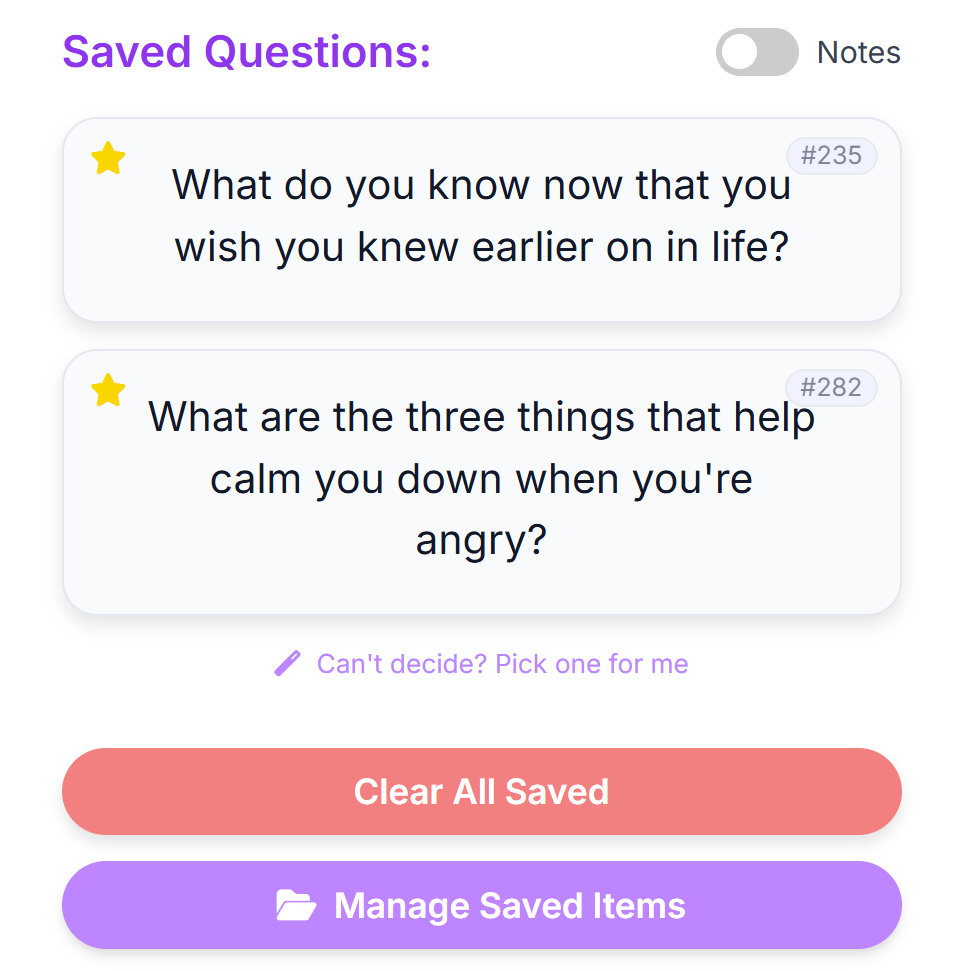
As you browse any deck, you can build a personal list of favorites. This list is saved to your device automatically.
Star to Save & Add Notes
Tap the Star icon on any card to save it. Open the "Saved Items" tray at the bottom to see your collection.
Play Your Favorites (Randomizer)
You don't have to go back to a deck to play. Tap the "Pick Random" button inside your Saved Items list to let the app choose one of your favorites for you.
Advanced: Data & Backups (Labs)
Since your data is stored in your browser, clearing your cache will delete it. Use the tools in the "Labs" section to keep it safe:
- Export (HTML): Creates a beautiful, printable report of your questions and notes. Great for reading offline.
- Backup (JSON): Creates a raw data file. You can use the "Restore" button to load this file onto a different device.
9. Advanced Tools & Sharing
Unlock the full potential of the deck with these power-user features.
Advanced Search
Use the search bar at the top to find specific content:
- Keyword: Type "love" or "work" to find related questions.
-
City Search: In the Global deck, type
hongkong:5to find question #5 from Hong Kong. -
Global Search: Type
global:10to find the 10th global question.
Floating Actions (Tap to Select)
Instead of highlighting text, simply tap any question card to select it. This reveals powerful floating buttons in the bottom-right corner:
- Look Up & Translate: Instantly search terms on privacy-focused engines like Qwant or translate the question using DeepL.
-
Copy & Share: Opens
a special menu with options:
- Create Graphic: Launches the Digital Souvenir engine. This instantly renders a beautiful, downloadable image card of the prompt that is perfectly sized for Instagram and social sharing.
- Copy Text: Copies the question to your clipboard.
- Share Link: Generates a direct link. By opening the Advanced Link Options in the share menu, you can even force the receiver's screen to load in Concise Mode or Core-Only Mode so they see exactly what you want them to see!
- Paste in Session: Instantly sends the question to the Live Board. If you are already tethered to a live room, the app will instantly teleport you there and automatically open the submission modal for you!
"What is something you’ve been grateful for recently?"
 Curious Souls Cafe
Quick Tools
You will also see these buttons floating permanently:
- Dice: Instantly opens the Dice Roller.
- Join: Quick link to the Live board.
📚 Topic Catalog
Ready to pick a deck? Browse our full collection below. Each of these topics has been developed for and real-world tested in our events. Use the search bar to filter by keyword (e.g., "Work", "Love").
- Adulthood: Explore the holistic journey of adulting—personal growth, authenticity, and connection.
- Anchors: Between staying adaptable and staying grounded, discover anchors that keep us centered in the storm.
- Authenticity: Align your actions with your values and embrace your true self.
- Beginner's Mind: Cultivate curiosity, embrace 'not knowing,' and see the world with fresh eyes again.
- Conscious Choice: Check blind spots, untangle passed-down habits, and take the steering wheel of life.
- Fluidity: Celebrate our ever-evolving selves, and discover the beauty of living beyond labels.
- Healthy Friction: Explore why productive conflict, and embracing everyday discomfort can lead to a deeper, more resilient life.
- Inner Child: Reconnect with your playful younger self and nurture creativity.
- Internal Compass: Navigate life by tuning into your intuition, and aligning with your core values.
- Languages We Live: Dive into the curious space where our words, thoughts, and identities meet.
- Life Entrepreneur: Ignite self-leadership and entrepreneurial thinking.
- Reflection: Explore how reflection transforms memories into meaning.
- Reimagine: Explore evolving perspectives and reimagine life’s narratives.
- Resilience: Explore how you adapt and find meaning when life tests your limits.
- Stillness: Unplug, protect inner peace, and find simple moments of joy amidst the relentless pace of modern life.
- Solitude: Distinguish healthy alone time from loneliness.
- Transitions: Navigate life’s changes with prompts that foster reflection.
- Friendship : Deepen connection and explore the many facets of meaningful friendships.
- Harmony: Unplug, protect inner peace, and find simple moments of joy amidst the relentless pace of modern life.
- Interdependence: Explore the invisible threads that sustain our relationships and communities.
- Parenting: Inspire reflection on the joys, challenges, and growth in raising children.
- Sincere Lens: Reframe everyday annoyances, decode unspoken signals, and choose curiosity and compassion over snap judgments.
- Why We Love: A deep dive into the motivations behind our relationships.
- Flow: A journey to sharpening your focus and mastering the art of effortless engagement.
- Focus: How we find, lose, and design focus.
- Synergy: True collaboration and adaptive team dynamics.
- Work that Resonates : Explore your evolving relationship with work and fulfillment.
- Clarity: Cutting through noise with values, self-awareness, and insight.
- Flourishing : Spark deep dialogue on purpose, virtue, and resilience.
- Legacy: Reflect on the impact you make and transform values into legacy.
- Purpose: Explore meaning and the journey toward a fulfilling life.
- True Wealth: Explore what it means to live a truly rich life beyond material wealth.
- Action Prompts: Spark gratitude, kindness, and inspiration with creative tasks—perfect for icebreakers or mid-session vibe shifts to wake up a quiet room.
- All in One: Spark meaningful conversations across all topics. (Includes a "Topic Mixer" to select specific categories!)
- Deep Talk: Curated in Seoul, a reflection on modern life’s complexities.
- Global Curiosities : Questions written by participants from our events around the world. (Toggle "Location Mode" to browse by city!)
- Icebreaker Starter : A playful, low-pressure warm-up deck on relatable preferences, daily habits, and micro-joys.
- Joy · Love · Mind: Curated in Singapore, explore a conversational journey from happiness to love and the mind.
- Meta Deck Host : An advanced facilitation tool designed to steer group dynamics with prompts about the conversation itself.
- Self to Cosmos: Curated in Groningen, playfully ponder the massive, beautiful questions of the human experience.
- Small Wonders Starter : Find magic in daily routines. Explore subtle moments & everyday anchors that bring meaning to life.
No topics found. Try a different keyword.
💖 We express our heartfelt gratitude to our Singapore host for curating the Joy · Love · Mind collection, our Seoul host for their thought-provoking Deep Talk deck, our Groningen host for their expansive Self to Cosmos deck, and all participants who contributed to Global Curiosities.
Ready to start talking? Pick a deck and dive in!
Launch Conversation Decks🛠️ Explore Other Tools
Enhance your gathering with our other facilitation tools.
Collect · Reflect
Your hub to curate questions, organize them with custom tags, and journal in Zen Mode, plus a professional Session Log for facilitators.
Curious Souls Cafe aims to foster a collaborative and reflective environment where dialogue and shared experience create meaning and build connections. The methods discussed here are flexible and can be adjusted to fit your group's needs.